


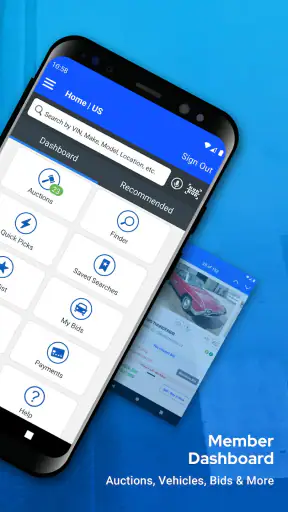
I found Copart - Online Auto Auctions most useful when I treated it as a mobile bidding workspace rather than a simple car-shopping app. Its central promise is straightforward: it puts a very large selection of vehicles in your pocket and lets you search, inspect listing details, and take part in auctions from an Android or iOS device. In practice, that changes the first stage of buying a vehicle. Instead of driving from lot to lot or checking scattered classified ads, I can begin with a focused search and narrow down possibilities from almost anywhere.
That convenience is also the reason I would not recommend using it casually. An auction listing is not the same thing as a ready-to-drive car at a fixed retail price. The app can make discovery and bidding easier, but it does not remove the need for careful reading, realistic budgeting, and a clear plan for what happens after a winning bid. My overall impression is that Copart is strongest for shoppers who understand auction buying or are willing to learn its discipline.
Searching a huge auction inventory from a phone
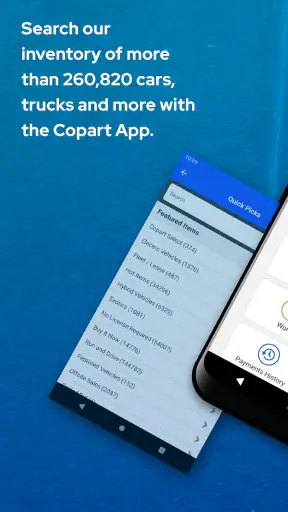
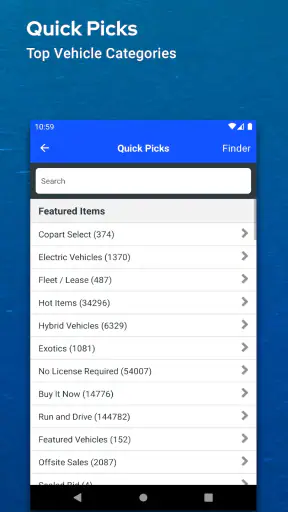
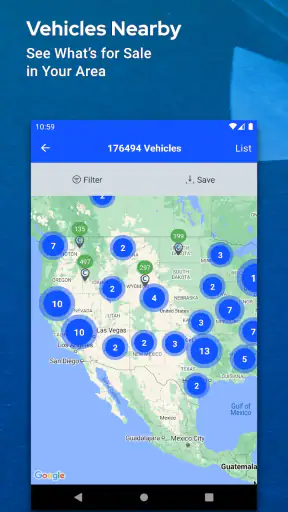
The capability that matters most here is the combination of vehicle search and auction access. Copart, the developer, has built the app for people who want to browse a broad marketplace of cars and related vehicles without being tied to a desktop computer. The service presents more than a quarter of a million cars, which is a scale that can be useful when I am looking for something specific rather than merely browsing whatever happens to be nearby.
I would describe the app as a research and decision tool first. The search experience helps turn a massive inventory into a manageable shortlist. A shopper can begin with a make, model, body style, location, or vehicle condition in mind, then compare individual listings instead of relying on one general search result. That is especially valuable for someone hunting for a particular replacement vehicle, a project car, a donor vehicle, or an option that is difficult to find through ordinary classified listings.
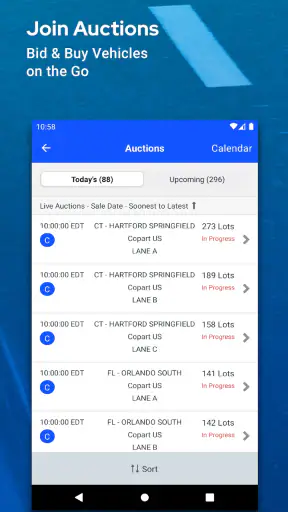
The important distinction is that the app is built around auctions. A conventional marketplace usually encourages me to compare asking prices and contact a seller. Copart encourages a different rhythm: discover a listing, examine its information, decide whether it fits my limits, and follow the sale closely enough to act responsibly. The phone becomes a way to stay connected to that process, not a shortcut around the process itself.
I also appreciate that the application is free to install. That makes it practical to use during the early research stage, even if I am not ready to bid. The app has an Everyone content rating, so its presentation is intended for a broad audience. It has been available since July 2, 2015, and the current release is version 6.8.1, with support beginning at iOS or Android version 9. Those details suggest a mature mobile product rather than a newly launched experiment.
Its reception is strong: it holds a 4.8 average from roughly 63 thousand ratings, alongside about 3.5 thousand written reviews and more than 5 million installs. I would not treat popularity as proof that every auction will be smooth, but it does indicate that the app has reached a substantial audience and that mobile access is a meaningful part of how people use Copart.
Why the search capability changes the buying process
In a normal car search, the main challenge is often finding enough suitable vehicles. With an auction inventory this broad, the opposite problem appears: there may be too many possibilities. A useful workflow is to define the non-negotiables before opening the app. I might decide that the vehicle must be within a reasonable collection area, have a particular body type, and stay below a maximum total project budget. That prevents an attractive listing from quietly changing my original plan.
Another practical benefit is comparison. Rather than judging one listing in isolation, I can save several candidates mentally or in my own notes and compare their condition descriptions, visible damage, location, and sale timing. This is more valuable than simply scrolling through photographs because it forces me to ask whether a lower apparent price is really compensating for greater repair, transport, or inspection risk.
The app is therefore at its best when I use it to create a shortlist, not when I use it to chase every interesting vehicle. Auction browsing can encourage impulsive bidding because each listing feels like a limited opportunity. A disciplined shortlist turns the phone into a filter against that impulse.
How I would use it before placing a bid
My first step would be searching broadly, then narrowing gradually. Starting with an exact model can produce too few useful results, while starting with no boundaries can produce an overwhelming feed. I would begin with the type of vehicle and the area I can realistically handle, then refine by model, condition, and sale details as the list becomes clearer.
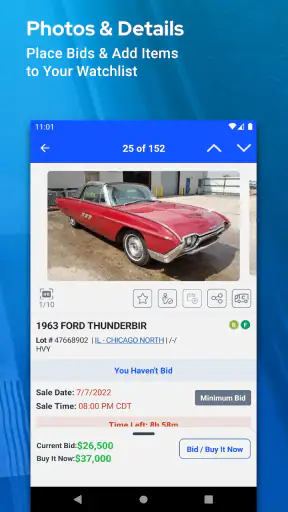
When a listing catches my attention, I would read every visible detail before thinking about the bid amount. Photos are helpful, but they are not a substitute for a physical inspection. Images can show obvious damage and give a sense of the vehicle’s overall state, yet they cannot answer every question about mechanical condition, hidden damage, missing parts, or the cost of returning the car to dependable use.
This is where the app’s convenience needs to be balanced with offline work. I would use the listing as a starting document, then verify the vehicle identification details, title or ownership information shown for that lot, location, and any restrictions that affect my plan. If I could not inspect the vehicle myself, I would consider whether a trusted mechanic or inspection service could do it. The mobile app helps me find and monitor the opportunity; it does not replace the person who can look at the vehicle in person.
A realistic everyday example would be someone whose car has become too expensive to repair. During a lunch break, that person could search for several replacement candidates, compare their locations and visible condition, and build a shortlist for an evening review. The sensible next move would not be an instant bid. It would be calculating transport, repairs, registration, and a reserve for surprises, then deciding whether any candidate still makes sense.
The budget needs more than a bid ceiling
The most important habit I would recommend is separating the bid limit from the total spending limit. A winning bid is only one part of the purchase decision. I would write down a maximum all-in budget before bidding and subtract estimated transport, repairs, parts, inspection, taxes or other applicable charges, and a contingency reserve. The remaining amount becomes the maximum bid, not the other way around.
This approach is particularly important for project vehicles. A car that looks inexpensive in the search results may need bodywork, safety repairs, tires, fluids, diagnostic work, or replacement electronics. Even if I plan to do some work myself, parts and time still have value. The app makes it easy to focus on the visible auction amount, so I have to deliberately keep the full ownership calculation in view.
I would also avoid making a bid while distracted or near the end of a busy day. The phone makes participation convenient, but convenience can work against careful judgment. Before acting, I would reread the listing, confirm that I am looking at the intended lot, and check my notes. A few seconds of verification can prevent a surprisingly expensive mistake.
What the app is like during active auction research
For me, the strongest mobile advantage is flexibility. I can review candidates without sitting at a computer, which suits people who are commuting, working irregular hours, or coordinating a purchase with another person. A buyer might send listing details to a partner or mechanic for a second opinion, then return to the app after discussing the risks.
That said, a small screen is not always ideal for detailed comparison. Vehicle photographs and listing text are easier to study on a larger display, particularly when I am trying to notice damage or compare several candidates at once. I would use the phone for discovery and monitoring, but I would not hesitate to move to a computer or a larger screen for the final research session if the decision were significant.
Another limitation is emotional rather than technical. A stream of interesting listings can make every vehicle feel urgent. The best protection is to define a stopping rule: if the listing fails a non-negotiable requirement, if the estimated total exceeds the budget, or if essential information remains unclear, I move on. The size of the inventory means there is usually more value in waiting for a better match than forcing a poor one.
The buyer who benefits most from Copart
I think this app is a strong fit for experienced auction buyers, independent repairers, vehicle enthusiasts, and shoppers who have a specific search brief. It is also useful for people who live far from a traditional dealership selection and want to investigate a wider range of vehicles. Someone looking for a project car may value the breadth of listings more than the simplicity of a fixed-price purchase.
It can also help a buyer who is still learning, provided that person treats the app as an education and research tool instead of a game. Browsing without bidding can teach me how vehicle condition affects interest, how locations influence practicality, and how quickly a seemingly attractive option becomes less appealing after a complete cost estimate. That learning stage is worthwhile and does not require rushing into a purchase.
On the other hand, I would steer a first-time buyer toward a conventional dealer or fixed-price marketplace if the priority is a predictable, ready-to-use vehicle with a simple checkout experience. Copart is not the best fit for someone who needs transportation immediately, cannot arrange collection, has no repair budget, or feels uncomfortable making decisions with incomplete physical inspection. In those cases, the apparent bargain may create more stress than value.
The app is also less suitable for anyone who does not have a clear plan for transportation and repairs. A vehicle located far away can become impractical even when the listing itself looks appealing. Before bidding, I would confirm how the car could be collected, where it would be stored, and who would handle the first inspection. Those questions belong in the buying decision, not after it.
How it compares with ordinary car-shopping apps
Compared with classified-ad apps, Copart offers a fundamentally different kind of search. Classified platforms are usually easier when I want to contact a seller, inspect a vehicle as a conventional purchase, and negotiate around a known asking price. Copart is more useful when I want access to auction inventory and am prepared to evaluate risk, timing, and total cost.
Compared with dealership apps, the contrast is even clearer. Dealership shopping tends to emphasize financing, test drives, warranties, and vehicles prepared for retail buyers. Copart is more compelling for selection and opportunity, especially when I am comfortable with vehicles that need work or with a more involved purchase process. The trade-off is that I take on more responsibility for research and planning.
Compared with desktop browsing, the mobile app wins on immediacy. I can check candidates wherever I am and keep the search moving. The desktop experience may still be more comfortable for long comparison sessions, detailed note-taking, and reviewing several pieces of information side by side. I see the phone app as complementary rather than automatically superior: it is the tool I reach for throughout the day, while a larger screen can be better for the final deep dive.
Small habits that make the experience safer and more useful
I would keep a simple candidate log outside the app. For each vehicle, I would record the listing identifier, location, expected transport, estimated repairs, and the maximum all-in amount I am willing to spend. This may sound basic, but it prevents multiple attractive listings from blending together and makes it easier to explain the decision to a mechanic, family member, or business partner.
I would also compare several vehicles before deciding that one is special. The broad inventory is most valuable when it gives me alternatives. If I find only one candidate and immediately become attached to it, I lose the negotiating power that comes from being willing to walk away. A second or third acceptable option makes the auction process less emotional.
For a vehicle intended as daily transportation, I would be stricter than for a hobby project. A project can tolerate uncertainty if I have time, tools, and a separate vehicle. A daily driver cannot. In that situation, I would place more weight on a credible repair path and nearby collection than on a low initial auction amount.
I would treat every unclear detail as a reason to investigate, not as permission to assume the best. That is one of the app’s central trade-offs: it can put an opportunity in front of me quickly, but the speed of discovery may tempt me to fill gaps with optimism. Good auction buying depends on doing the opposite.
What I would expect from the mobile experience
Since the app is free and widely used, it is easy to make it part of a regular search routine. I would browse during short breaks, save promising details in my notes, and reserve serious evaluation for a quiet session. That division keeps casual discovery separate from financial commitment.
I would also keep the app updated. The current version is 6.8.1, and using the current release is generally sensible when an app is involved in time-sensitive browsing and bidding. I would still make sure my device runs at least iOS or Android version 9 before relying on it, because compatibility matters most when I am away from a computer and need access immediately.
The strong rating and large install base make Copart feel established, but they do not change the nature of the purchase. A popular app can improve access to listings; it cannot guarantee that a particular vehicle suits my needs. That judgment remains mine, and it depends on inspection, budgeting, and logistics more than on the convenience of the interface.
My recommendation after using it as an auction tool
I recommend Copart to readers who want a focused way to search auction vehicles and who are prepared to do the work behind each possible purchase. Its main strength is not simply that it displays many cars. It brings the search, comparison, and bidding process closer to everyday life, making it easier to investigate opportunities before they disappear from view.
The app is especially worthwhile when I have a precise goal: a certain type of project, a hard-to-find model, a replacement vehicle within a defined area, or a shortlist for a repair business. In those situations, a large auction inventory can offer possibilities that ordinary local classifieds may not.
I would skip it as my primary shopping tool if I need a guaranteed, ready-to-drive car with predictable costs and minimal effort. A fixed-price dealer or conventional marketplace is likely to be a better match for that need. Copart rewards patience and preparation, while impulsive browsing can expose an inexperienced buyer to costs that are easy to overlook.
My final view is positive, with an important condition: use the app to improve your research, not to replace your judgment. The free Shopping app from Copart gives me a practical mobile window into a substantial auction marketplace, and its 4.8 average shows that many users find that access valuable. I would install it for discovery and monitoring, build a complete budget before bidding, arrange inspection and transport in advance, and walk away whenever the numbers or the vehicle details stop making sense.


